
Examining industry evolution: Interact
Previously I shared my observations that AI is fundamentally changing intranets, where AI functionality is weaved into the fabric so that it significantly different from familiar or “traditional” architecture and UX. Interact’s latest release is a good example of a significant shift from a traditional interface into an AI-powered one: AI-powered homepages, agents, and using AI to generate entire sites are just a few examples. I’ve shared more below to illustrate what they and similar vendors are doing. You can see more examples in The 2026 ClearBox report (free to download).
A quick caveat: We’ve only had a short demo of the new functionality and I’ve shared initial thoughts and impressions below. We’ve not tested the features to any great extent and the broader impact on the platform is yet to be explored in detail.
Interact: an overview
Interact is owned by UK-based Interact Software, which was founded in 1996. Over the past 30 years the platform interface has seen a handful of overhauls that reflect changes in the broader industry. Interact has also won a Choices Award badge from us for a number of years for the overall good experience delivered by the platform (alongside awards from others, like G2).
All this reflects the maturity of the platform and the vendor. They have navigated this space well for many years and accrued a good number of clients such as Subway, New York Life, Domino’s, Savills, Piedmont Healthcare, and Love’s Travel Stops.
As of mid-2026, Interact has threaded AI through the user experience in several places. ‘Cue’ is the term they give to the AI assistant for the individual, while ‘Conductor’ is the term for organisational activities.
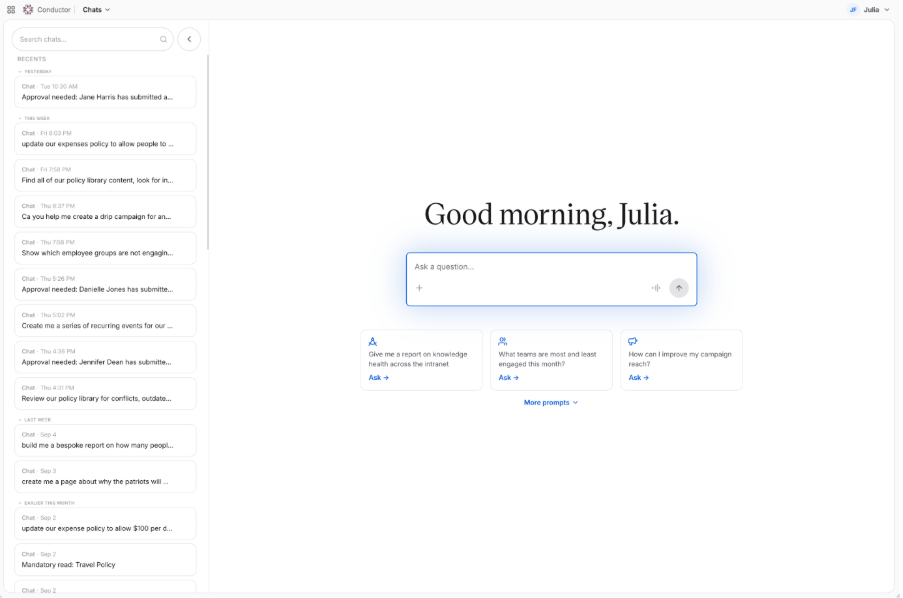
The initial Conductor screen gives a good indication of the range of capabilities on offer.
An AI-powered homepage and navigation
Making an intranet homepage feel relevant to each employee has been a long-standing challenge, and AI has promised us “hyper-personalisation” for a while. With Interact some of this is now being delivered: the content and display will adapt based not only on who’s looking but also on their behaviours. For example, if an employee isn’t interested in short-form visual updates in the form of ‘Stories’ then the widget will decrease in size and / or move it down the screen. Alternatively, if someone frequently interacts with the widget showing timesheet approval requests then this will become more prominent.
Some content can be controlled by admins however, such as pinning key communications, and the AI will help with reach targets. For example, if the whole organisation needs to read about changes to pensions, then the Cue AI will help make that happen in a way that’s most suitable for the individual, such as via a mobile push notification.
The homepage design has changed significantly from the previous iteration as a result, putting different types of content behind tabs for people to explore. This may feel restrictive for some organisations that want greater control, but if the Cue AI agent works effectively then we can see how this could be mitigated. Similarly, the vendor now advises a compact ‘burger menu’ for navigation rather than the traditional mega-menu as they believe employees are likely to search for information rather than browse. However, if an individual’s behaviour indicates they browse more frequently then the AI will recognise this and position the navigation more prominently.
The new Interact homepage will adapt based on the individual’s behaviour and preferences.
Cue AI agent and integrated notifications
As part of our ‘Digital Workplace Integrations and Services’ scenario in our reviews, we recognise that digital workplaces are often a fragmented set of tools, so we look at ways platforms help to simplify and improve an employee’s experience. With AI-driven chatbots now in common usage as part of this, employees expect conversational interfaces that are flexible, handle errors well, and are proactive about next steps.
For Interact, it’s easy to enter a natural language prompt into the Cue agent to complete an activity, such as booking time off. However, there’s no follow-up suggestions that we’ve seen elsewhere. For example asking “how many days PTO do I have” will surface an answer from an integrated HRIS but not follow up with “would you like to book something?” There’s a good range of integrations available for the agent though, so employees will be able to complete many tasks in this way. We also like the initial prompts where individuals can ask for summaries of things they’ve missed, or activities due that day.
The Cue agent also supports natural language questions for searching. We like the approach to limit hallucinations by explaining what’s missing vs what has been found, and suggesting Cue can help further. For example, asking “can I claim Post-Its back as expenses” would give an overview of what’s included in the expenses policy, then suggest Cue could help further with finding the right person to ask about Post-Its specifically. Where Cue believes content is missing, it will ask follow up questions which are then passed to an admin (see below).
Alongside the chat interface an ‘Inbox’ menu consolidates notifications from across the intranet and integrated systems. This clearly displays what needs the individual’s attention and Cue is on hand to answer questions or complete tasks where needed. This is unusual functionality but among the features we’re seeing more of as part of the interface-shift across the industry. We’ve understood the importance of notifications and helping employees keep on top of their tasks in our scenarios for years, so it’s good to see this supportive approach emerging.
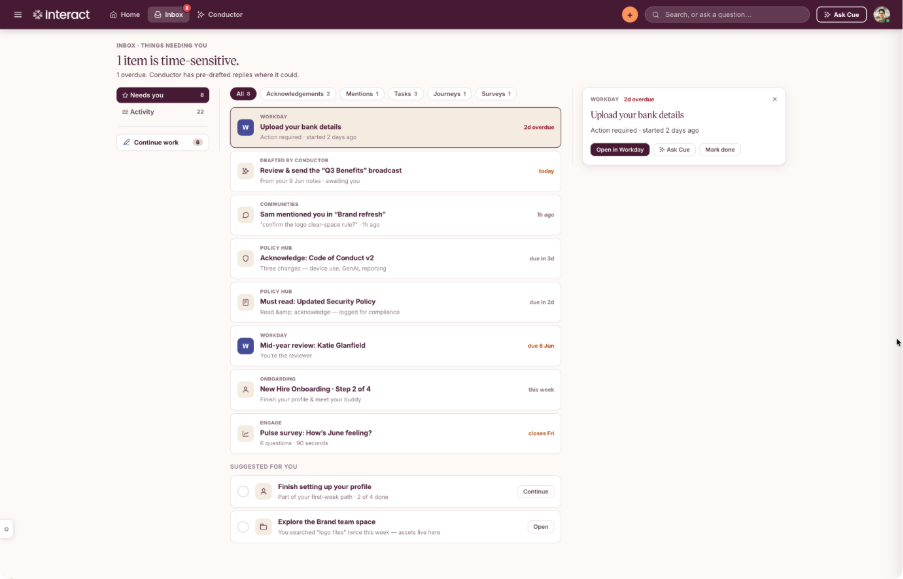
The ‘Inbox’ is useful and with Cue to support will allow people to complete tasks quickly.
Creating and maintaining content
Getting subject-matter experts to create and maintain intranet content is a challenge that many intranet managers will identify with. Although it doesn’t remove the problem, Conductor is a powerful tool for intranet and content managers that certainly makes it easier. Firstly, creating content is possible via prompts but also uploading a document as a starting point that’s edited in the Block Editor. Secondly, the results of mandatory reads can be displayed here too, with a simple follow up prompt to remind anyone yet to acknowledge the relevant content.
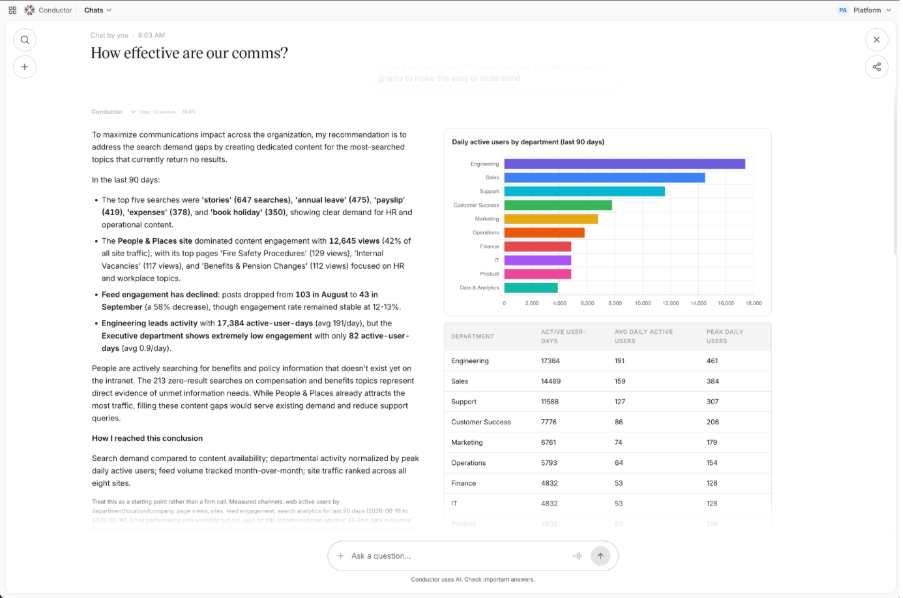
We like that analytics can be provided via Conductor, whether in diagrams or a more strategic overview with recommendations. Similarly, governance and lifecycle can be supported via the chat interface, such as by asking about pages needing a review. Across many platforms there’s still a lack of governance and lifecycle features when compared to front-end functionality, so we hope to see this expand even further in coming months.
An example ‘strategic summary’ of analytics results and advice.
AI configuration and correction
We hear from many of ClearBox’s clients that they are keen to use AI more extensively in their organisations, but that there’s also a degree of caution in how it is rolled out, so it’s good to see controls in place for configuring the AI in Interact. For instance admins are able to define the assistant’s tone of voice, role and context when provided search support. Conductor also helps here, providing admins with a prompt log. This allows them to review answers accuracy, then edit the response that Cue provided for use in future queries.
The prompts log is stored in memory indefinitely (called ‘org memories’), and overnight a ‘Dream State’ process is run. This recommends new or edits to intranet content based on the most common or frequently used prompts. Conductor will then email the relevant person to review an error that needs to be corrected or where materials are missing. They can then assess the suggested resolution and edit as wanted or choose to ignore the suggestion.
The Dream State summary says:
“A headless agent reviews the org memories that get used most and drafts permanent intranet updates from them – new KB articles, edits to existing pages, or flags where a memory contradicts published content. Nothing goes live on its own: every change becomes an approval task you can accept, edit, or reject.”
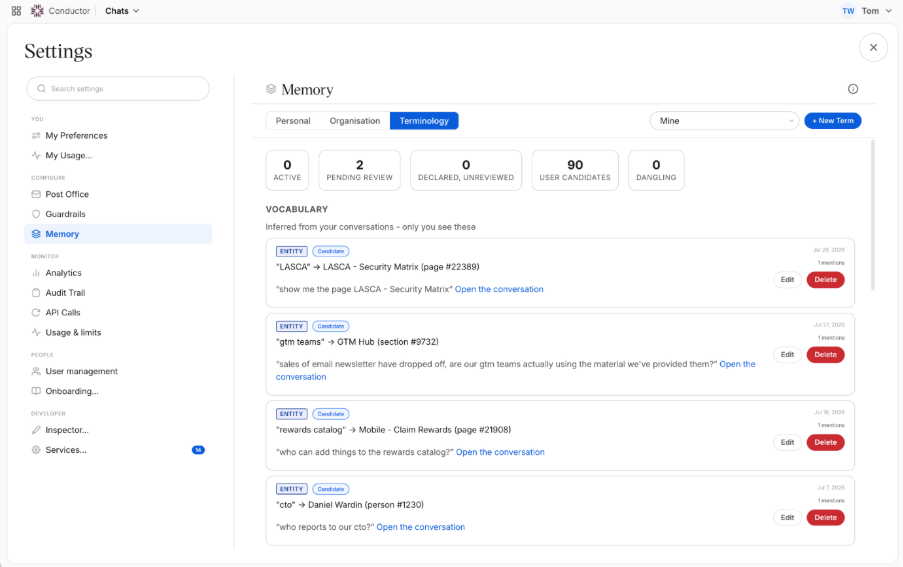
It’s possible to review all answers and update them manually.
Overall impression and final thoughts
Interact has been a powerful platform almost since its beginning and these new developments suggest its sophistication in the market will continue. The AI functionality is very new and this shows in some of the interface choices and initial configuration, but I suspect this will improve quickly as more customer feedback is received.
I’ve always been a big believer in giving people choice. For example, some people prefer navigating to content rather than searching for it, while some admins would rather build a page by hand than use AI. Interact plans to replace site admin screens with Conductor prompts over time, which will remove that element of choice. I think that’s a shame, but I might be among a minority.
Whether you believe we’re in an AI bubble that will burst or AI is a cure-all for digital workplace woes, the functionality now on offer in Interact is compelling. Hopefully that choice will remain for employees and admins alike, so they can work with their intranet in the way that suits them best.